Interactive Group
360 Dashboard Reports
360 Dashboard Reports
Monitor group and organizational progress with Interactive Group Dashboards - available for both The PROFILOR® 360 and the Progress Check, a six-month follow-up to the original 360 assessment. Easily segment and compare data across business units, functions, geographic regions, organizational levels, and more.
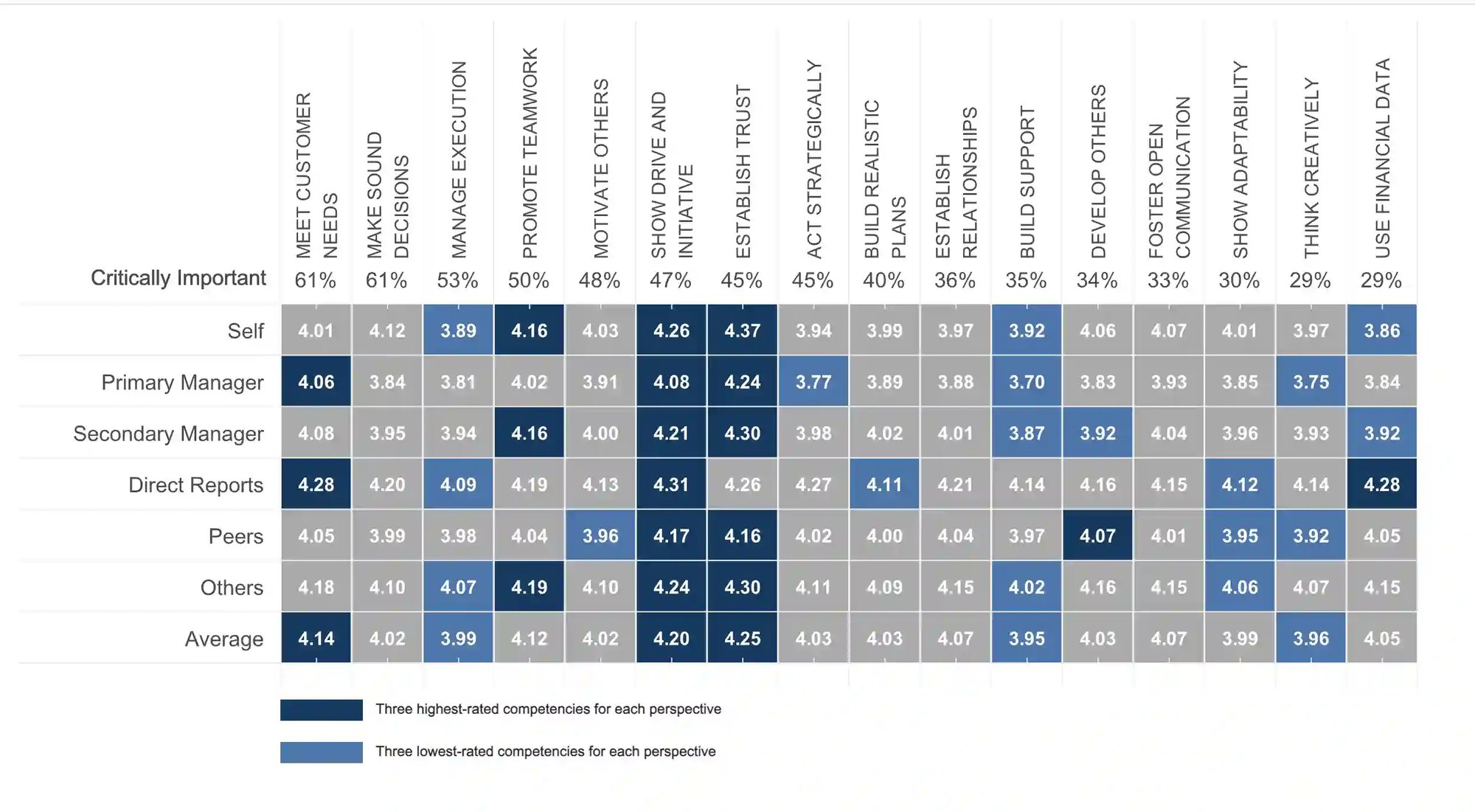
The PROFILOR® Dashboard
Capabilities Include:
- Identify leadership gaps and themes from the 360 assessment
- Compare important segments of your organization (e.g., leaders in different
functions) - Inform learning and development needs analysis and program plans
- Focus key talent and succession discussions
- Direct strategic workforce planning discussions
- Export data and drill down for additional insights
The Progress Check Dashboard
The Progress Check group dashboard gives organizations a clear view of the 360 competencies and behaviors leaders prioritize in their development. It highlights what leaders are focusing on and reveals patterns across different groups or segments, helping organizations better understand strengths, gaps, and emerging trends.
These insights enable L&D teams to refine their strategies based on real data and drill deeper to uncover additional insights that support more targeted, effective development.


Schedule a Meeting With An Expert
FAQs (Frequently Asked Questions) About Group 360 Feedback Reports
A Group Dashboard Report is an interactive reporting tool that aggregates The PROFILOR® 360-degree feedback data across teams, departments, business units, or entire organizations. It helps organizations identify trends, leadership strengths, development opportunities, and progress at a group level rather than focusing on individual participants.
Group 360 Reports can help organizations identify leadership gaps, uncover common themes, track development progress, and highlight strengths and opportunities across different employee groups.
Yes. Group Dashboards allow organizations to compare 360 assessment data across business units, functions, geographic regions, organizational levels, leadership cohorts, and other segments to better understand differences and trends.
The dashboard helps learning and development teams identify organizational development needs, prioritize leadership competencies, measure program effectiveness, and make data-driven decisions about future development initiatives.
Yes. Organizations can use group 360 assessment reports to identify leadership gaps, determine where additional support is needed, and focus development resources on areas with the greatest impact.
Yes. Dashboard data can be exported to perform additional analysis and gain deeper insights.
The Progress Check Group Dashboard is designed to complement a 360 assessment by measuring development progress over time. It provides visibility into the competencies and behaviors leaders prioritize and tracks changes following development efforts.
Yes. The Progress Check Dashboard enables organizations to monitor improvement and effort levels for specific groups, such as leadership development program participants, helping assess the effectiveness of development initiatives.
Organizations can analyze which competencies leaders are focusing on, determine what is improving, identify areas where progress is slower than expected, and uncover emerging organizational development trends.
L&D teams can use dashboard insights to refine development strategies, prioritize investments, adjust training plans, and ensure resources are aligned with the organization's most critical leadership needs.
Yes. The dashboard includes drill-down capabilities that allow users to explore data in greater detail and uncover insights within specific segments or groups.
Group 360 Reports are commonly used by HR leaders, talent management professionals, learning and development teams, organizational development practitioners, executives, and business leaders responsible for workforce strategy and leadership development.
Yes. Interactive Group Dashboards are available for both The PROFILOR® 360 assessment and the Progress Check follow-up assessment, allowing organizations to measure both current performance and ongoing development progress.
The dashboards provide organization-wide leadership insights that can inform workforce planning discussions, development priorities, talent strategies, and long-term organizational growth initiatives.